
How do I record owner contributions and owner draws?
If you're an existing business owner (or have used other accounting software before), you may be familiar with the concepts of owner contributions and owner draws. These are ways of tracking money that flows between you personally and your business — money that isn't income, and isn't a deductible business expense.
This article walks through:
- What owner contributions and owner draws are
- How to record them explicitly in Seller Ledger
- How Seller Ledger uses the Owner's Equity account behind the scenes to keep your books balanced — even when you don't think about it
What is an owner contribution?
An owner contribution happens when you put your own personal money (or personal assets) into the business. Common examples include:
- Transferring money from a personal checking account into your business bank account to cover expenses
- Paying for business supplies with a personal credit card
- Contributing inventory you already owned personally into the business for resale
Contributions are not income to the business — you're not earning that money, you're just funding your own business with your own funds. So they should not show up on your Profit & Loss or your Schedule C. Instead, they increase your Owner's Equity — essentially, your stake in the business.
What is an owner draw?
An owner draw is the opposite: it's when you take money (or assets) out of the business for personal use. Common examples include:
- Transferring money from your business bank account to your personal checking account
- Using a business debit card or credit card to buy something personal
- Taking inventory out of the business to keep for yourself
Draws are not a business expense — they aren't deductible on your Schedule C. Just like contributions, they don't affect your Profit & Loss. Instead, they decrease your Owner's Equity.
How to record owner contributions and draws in Seller Ledger
Because Seller Ledger is designed primarily for Schedule C filers — who don't need to report balance sheet balances on their tax return — we hide most of the double-entry accounting details from the interface. But the Owner's Equity account is still there behind the scenes, and you can record contributions and draws against it in a few different ways.
If the transaction is in a connected bank or credit card account
If you deposited money into a connected business account, that deposit will show up in the connected account automatically. All you need to do is categorize it correctly.
- Click into the connected bank or credit card account from your dashboard.
- Find the deposit (for a contribution) or withdrawal (for a draw).
- Click to categorize the transaction.
- Scroll to the bottom of the category list and choose Owners equity.
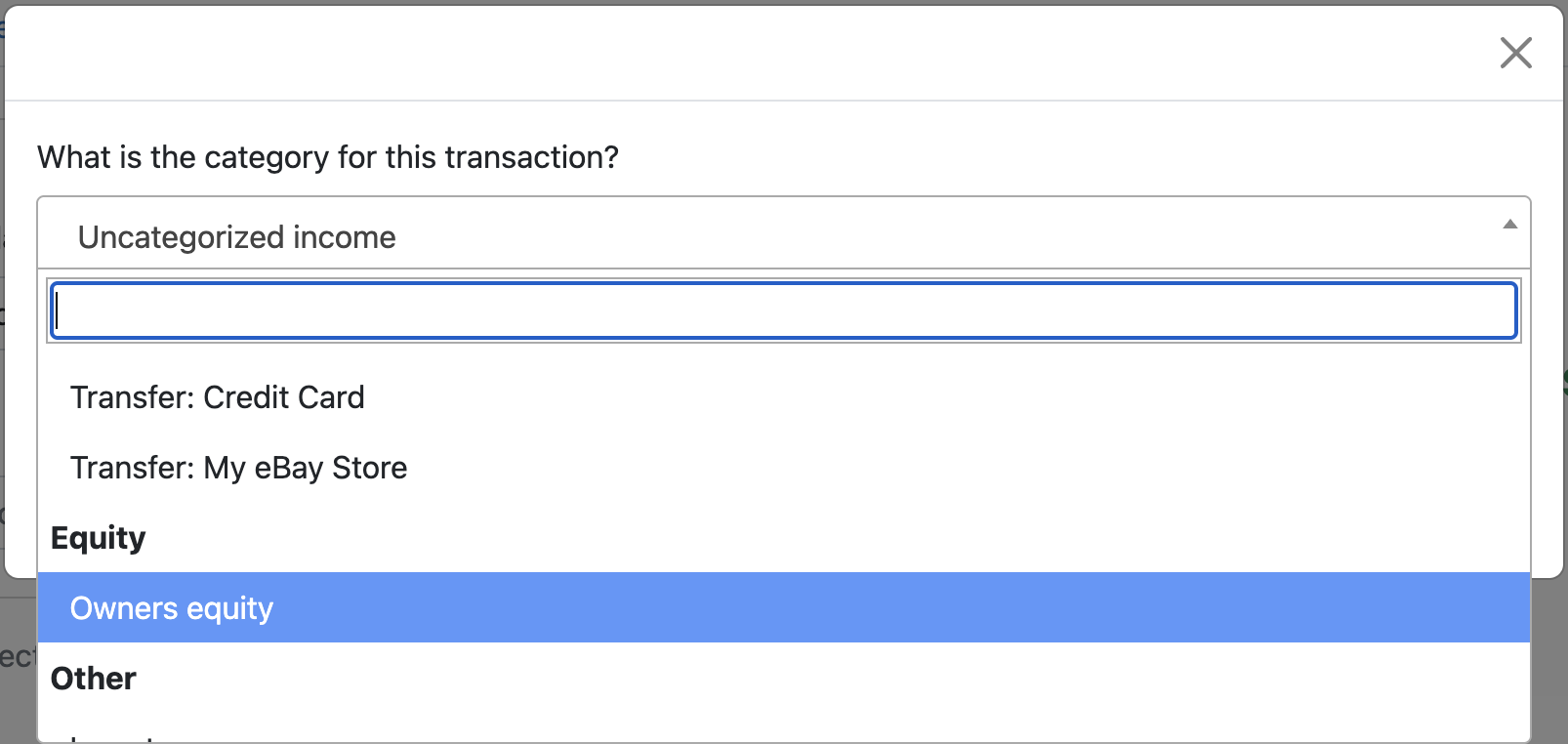
That's it. \Seller Ledger records the other side of that transaction against Owner's Equity — increasing it for contributions, decreasing it for draws — so your books stay balanced automatically. (More on how this works in the next section.)
How Seller Ledger uses Owner's Equity behind the scenes
Even if you never explicitly think about owner contributions or draws, Seller Ledger is quietly using the Owner's Equity account to keep your books balanced. Here are a few common places where this happens automatically:
"Not for business" transactions
When you have personal transactions in a connected bank or credit card account, you can categorize them as Not for business.
Behind the scenes, we treat it like an owner draw (for personal purchases made with business funds) or an owner contribution (for personal deposits into a business account). The other side of the transaction lands in Owner's Equity, keeping everything balanced — without you having to think about it.
For more, see How do I handle personal transactions in a bank or credit card account?
Manually added inventory purchases
When you manually add an inventory purchase (from Inventory → Add Inventory) but don't tie it to a specific bank or credit card transaction, Seller Ledger assumes you paid for it with personal funds.
Behind the scenes, we treat this like an owner contribution: you brought something of value into the business, but the money to pay for it came from your personal pocket. The inventory asset goes up, and Owner's Equity goes up by the same amount.
This is why manual inventory entries don't require you to say which account the money came from — Seller Ledger fills in that gap for you.
Manually entered business expenses
Similarly, if you manually record a business expense (for example, a cash purchase at a garage sale, or an expense you paid on a personal credit card that isn't connected), Seller Ledger doesn't know which business account funded it.
In this case, we again assume it was an owner contribution — you personally covered a business expense out of your own funds. The expense hits your Profit & Loss (so you get the deduction), and Owner's Equity increases by the same amount to keep things balanced.
Inventory removed for personal use
When you remove inventory from stock and choose the reason Personal use, Seller Ledger treats it as an owner draw. The item leaves your inventory balance, but it's not recorded as an expense (because you didn't sell it or use it for the business). Instead, the cost comes out of Owner's Equity.
See How do I remove an item from inventory? for more.
Do I need to worry about any of this at tax time?
For most Schedule C filers, no. Contributions and draws don't appear on the Schedule C, so there's nothing extra to report. What matters is that your business income and business expenses are accurate — and by categorizing personal activity as "Not for business" (or recording explicit contributions and draws), you're making sure of that.
If you file a different type of return (for example, a partnership or S-corp return), you will indeed need to provide a balance sheet report to file your taxes. Fortunately, Seller Ledger has been doing most of the work behind the scenes to make this possible. It's one of the reasons our company, which is a Nevada C-Corp, is able to run all of our books through our own software.
Summary
- Owner contribution = personal money or assets going into the business (increases Owner's Equity)
- Owner draw = business money or assets going to personal use (decreases Owner's Equity)
- The simplest way to record either one in Seller Ledger is to categorize the transaction as Owners equity
- Behind the scenes, Seller Ledger uses Owner's Equity to keep your books balanced — for "Not for business" transactions, manually added inventory, manually entered expenses, and inventory removed for personal use — so you don't have to think about double-entry accounting