
How do I upgrade from a monthly plan to an annual plan?
If you started out on one of Seller Ledger's monthly plans and have decided you'd like to switch to the annual version of that plan, upgrading only takes a minute. Annual plans effectively give you two months free compared to paying month-to-month, and they also unlock access to more historical transaction data.
Why upgrade to an annual plan?
There are a couple of good reasons sellers choose to move from monthly to annual billing:
- Save money. Annual plans are priced at the equivalent of 10 months, so you get two months free compared to paying monthly for a full year. For example, the Starter plan is $10/month or $100/year (versus $120 if paid monthly).
- Get more transaction history. Monthly plans include up to 90 days of transaction history, the same as your free trial. When you upgrade to an annual plan, Seller Ledger will automatically go back and pull in data for the most recent tax year (where the connected marketplace, bank, or credit card allows it). This is especially helpful if you're trying to get a full prior year of data in for taxes. For more, see How do I get more than 90 days of transaction history?
- No impact on your transaction limit. Importing older data as part of the upgrade will not push you into a higher pricing tier. See Does upgrading to an annual plan count against my transaction limit? for details.
How to upgrade
- Log into your Seller Ledger account.
- Go to Settings → Billing, or click this link directly: https://app.sellerledger.com/settings/billing.
-
Click the Change plan button.
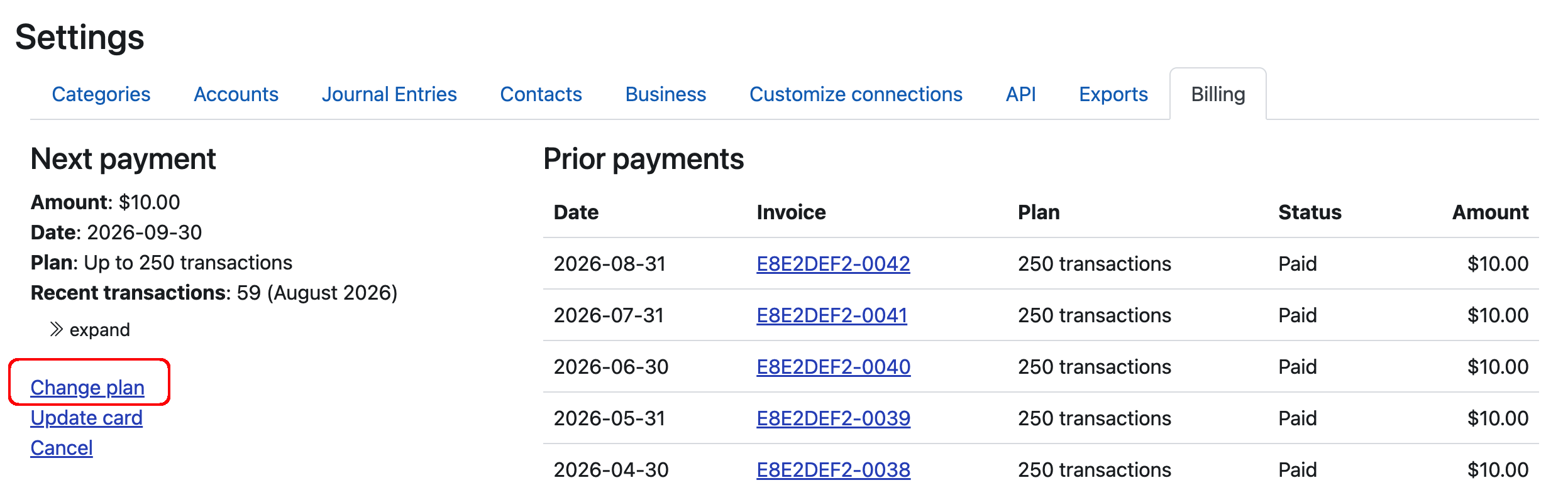
-
On the plan selection screen, choose the Annual plan.
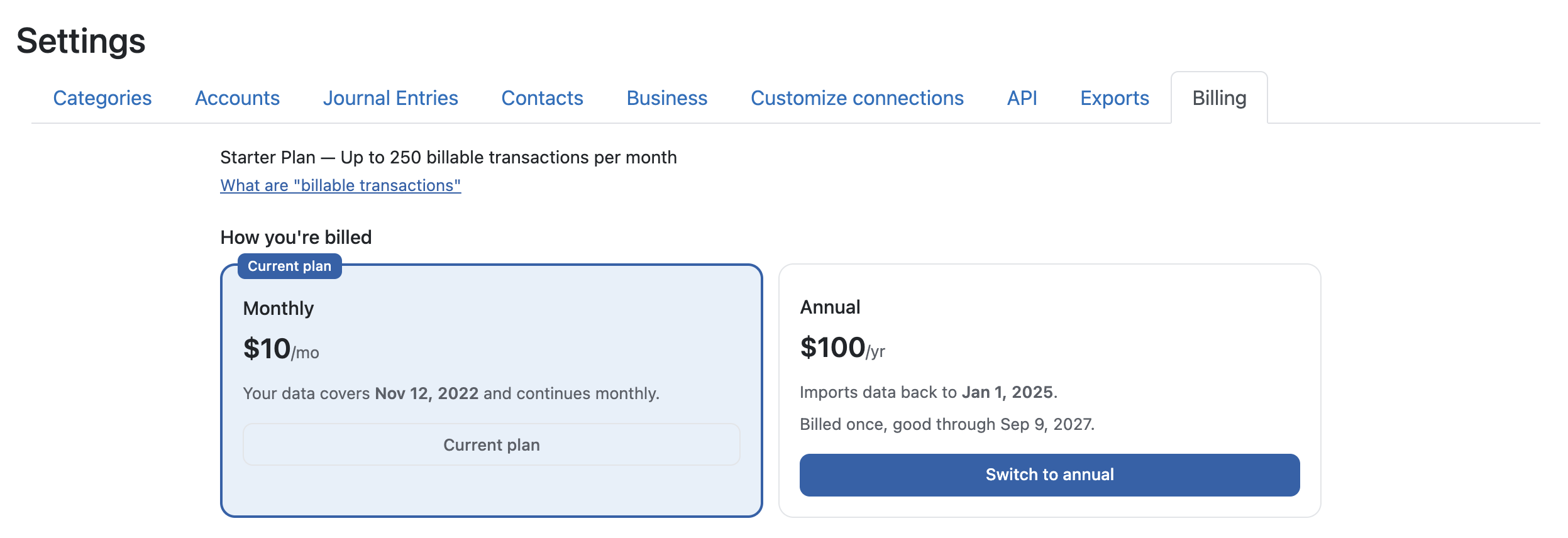
- If you recently signed up for the monthly plan, you'll be charged the difference between what you've already paid for the current month and the annual subscription price. For example, if you paid $10, you will be charged around $90 more for upgrading
That's it. Your subscription will renew annually going forward, on the anniversary of the upgrade.
What happens right after you upgrade
Once the upgrade goes through, a few things happen automatically:
- Older data starts importing. Seller Ledger will begin reaching back to pull in additional history from your connected marketplaces, banks, credit cards, and PayPal accounts. For most marketplaces, we can go back to January 1 of the most recent tax year. Banks and credit cards vary — some allow us to go back further automatically, others limit us to 60 or 90 days. If, for some reason, your older data doesn't automatically start importing, feel free to reach out to [email protected] and we can help.
- Your existing data stays put. Nothing you've already categorized or entered will be affected.
- Your next renewal is one year out. Instead of being billed monthly, you'll be billed once per year on the date you upgraded.
What if my bank or credit card won't provide older data?
Some banks and credit cards limit the amount of history they'll share through our banking partner (Plaid). If that happens, you can still get older data into Seller Ledger by uploading a CSV file of older transactions directly from your bank. See How do I properly format bank CSV files? for the format details.
If you upgrade to an annual plan specifically to get older data, and we're unable to retrieve what you need (and CSV upload isn't a workable option for you), just reach out to us. We're happy to cancel and refund the annual charge — we only want you paying for Seller Ledger if it's delivering the value you were expecting.
Frequently asked questions
Will I be charged the full annual amount right away?
You'll be charged the annual subscription price at the time you upgrade, minus a prorated credit for any unused portion of your current monthly billing cycle. After that, you won't be billed again until your annual renewal date.
Can I switch back to monthly later?
Yes. You can change plans at any time from the Billing page. If you switch back to monthly mid-year, reach out and we can help sort out any prorated refund.
Will upgrading push me into a higher pricing tier because of all the imported history?
No. Transaction limits are based on monthly transaction volume, and imported historical transactions are counted in the months they originally occurred — not lumped into the month you upgraded. See Does upgrading to an annual plan count against my transaction limit?.
What if I go over my monthly transaction limit after upgrading?
You won't be forced to move up a tier. Instead, we'll simply charge the difference between your current plan and the next tier up for any month where you exceed the limit by more than 10%. See What happens if I go over the transaction limit for my plan? for more.